

Language Learning
Preply Spanish Tutors: Find Your Ideal Teacher
A practical guide to selecting a Spanish tutor on Preply, from trial lessons to long-term progress.
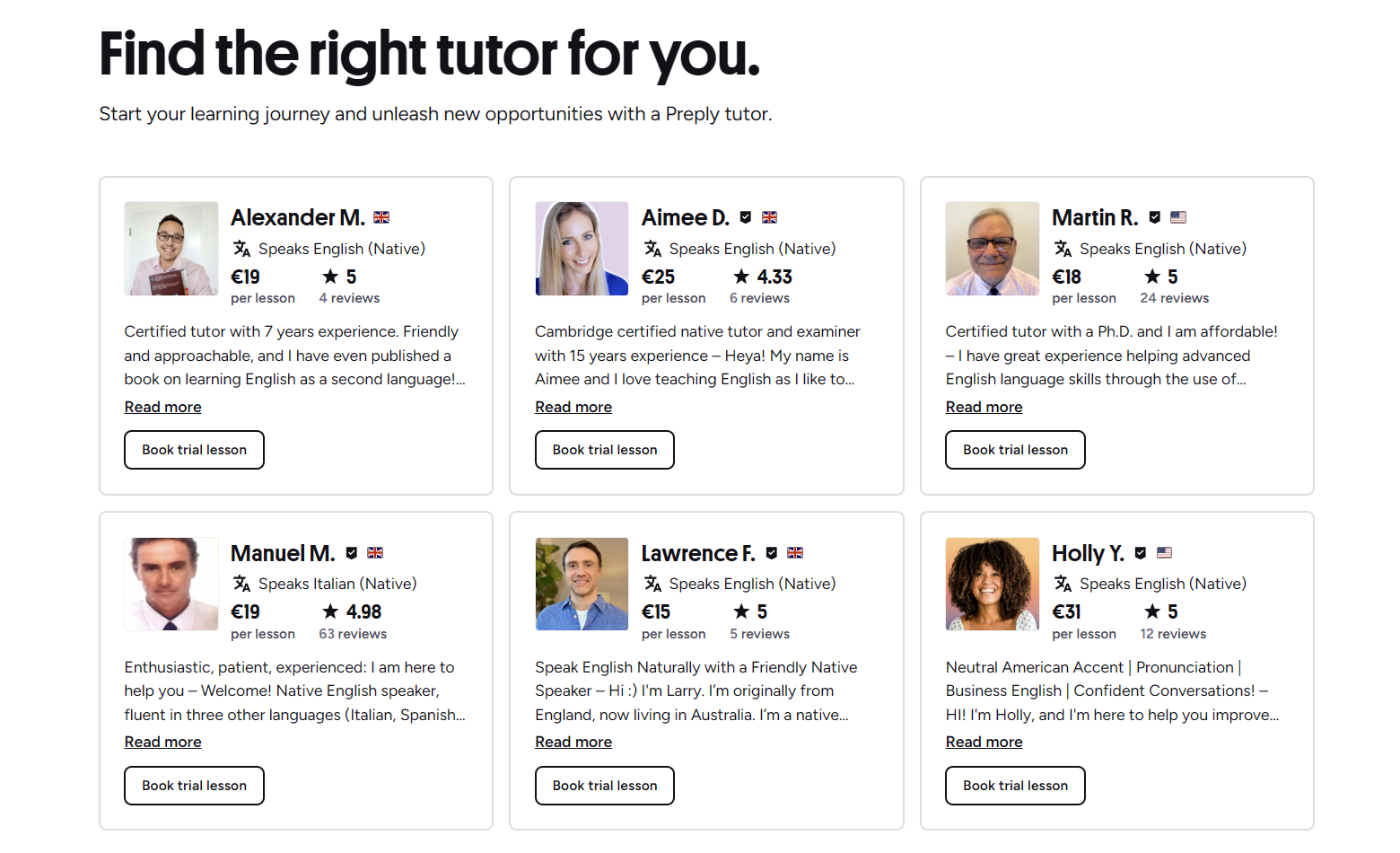
Preply has become one of the most visible platforms for finding a Spanish tutor online. The marketplace model lets you browse hundreds of profiles, filter by price, availability, and specialty, then book a trial lesson to see if the chemistry works. For learners who want flexibility and a wide pool of native speakers, it solves the biggest friction point: getting started quickly without committing to a rigid course schedule.
Contents
- 1. How Preply Connects You With Spanish Tutors
- 2. Filtering Tutors by Specialty and Availability
- 3. Understanding Tutor Profiles and Reviews
- 4. Trial Lessons: What to Expect
- 5. Pricing Structure and Subscription Options
- 6. Using the Preply App for Spanish Lessons
- 7. Tracking Progress Over Time
- 8. Preply for Business Spanish Training
- 9. Common Challenges and How to Address Them
- 10. Alternatives to Preply for Spanish Learning
- 11. Final Assessment of Preply Spanish Tutors
The experience varies widely depending on the tutor you choose. Some teachers follow structured curricula with textbooks and homework; others prefer conversation practice with light correction. Because Preply does not enforce a single teaching method, the onus is on you to define what you need and communicate it clearly. That freedom can be liberating or overwhelming, especially if you are new to language learning platforms.
How Preply Connects You With Spanish Tutors
The platform uses a search-and-filter system. You enter your target language, optionally set a price range, choose a time zone or availability window, and apply tags like "DELE preparation," "business Spanish," or "conversational practice." Results show tutor photos, hourly rates, star ratings, number of lessons taught, and a short video introduction. Clicking a profile reveals a detailed bio, teaching style description, student reviews, and a calendar for booking.
- Filter by native speaker status, certification, or specialties like medical or legal Spanish.
- Sort by rating, price, or number of lessons to surface experienced tutors quickly.
- Watch 30- to 60-second intro videos to gauge personality and accent before booking.
- Book a 25- or 50-minute trial lesson at a discounted rate to test compatibility.
After the trial, you purchase a subscription package — typically 4, 8, 12, or 20 lessons per month — which locks in a recurring weekly slot with that tutor. The subscription auto-renews unless you cancel or pause. This model encourages consistency but can feel rigid if your schedule shifts frequently.

Filtering Tutors by Specialty and Availability
Specialty filters are where Preply shines for Spanish learners. You can narrow the pool to tutors who explicitly teach DELE or SIELE exam preparation, Spanish for tourism, Latin American vs. European variants, or even niche areas like Spanish for healthcare professionals. Availability filters let you see only tutors with openings during your preferred hours, which saves time compared to messaging back and forth.
- DELE/SIELE prep: tutors familiar with exam format, timing, and scoring rubrics.
- Regional variants: choose between Castilian, Mexican, Rioplatense, Caribbean, etc.
- Professional focus: business, medical, legal, or technical vocabulary.
- Kids and teens: tutors with experience teaching younger learners using games and visual aids.
One limitation: the filter tags rely on tutors self-reporting their specialties. A tutor may tag "business Spanish" but have only casual experience. Always read reviews and ask specific questions during the trial to verify expertise.
Understanding Tutor Profiles and Reviews
Each profile displays a headline rate, total lessons taught, average rating, and a breakdown of 5-star, 4-star, and lower reviews. The review section includes written feedback and sometimes the student's native language, which helps you gauge if the tutor works well with speakers of your language. Video intros are optional but common; they give a sense of the tutor's energy, clarity, and accent.
Scroll horizontally to see all columns
| Element | What to Look For |
|---|---|
| Hourly rate | Ranges from $5 to $40+; higher rates often correlate with certifications or niche expertise. |
| Lessons taught | Above 500 suggests reliability; below 50 may mean newer tutor with more availability. |
| Rating distribution | Check for recent 4- and 5-star reviews; a few 1-star reviews among hundreds is normal. |
| Response time | Shown on profile; under 1 hour indicates active communication. |
| Certifications | DELE examiner, ELE certification, or university degrees in language teaching. |
Reviews sometimes mention technical issues like connection drops or platform bugs rather than teaching quality. Filter those out mentally. Focus on comments about lesson structure, error correction style, homework quality, and whether the tutor adapts to the student's pace.
Trial Lessons: What to Expect
A trial lesson is 25 or 50 minutes at a reduced price (often 50% off the tutor's regular rate). The tutor typically assesses your level, discusses goals, and demonstrates their teaching style. Treat it as a two-way interview: you evaluate them, they evaluate whether they can help you. Bring a short list of questions — preferred correction frequency, homework expectations, material sources — to make the most of the time.
If the trial feels off, you can book another with a different tutor. Preply allows multiple trials, though each costs the discounted rate. There is no free trial across the platform, but the low cost reduces risk.
Pricing Structure and Subscription Options
Preply does not publish a single price list; tutors set their own hourly rates. The platform takes a commission that decreases as the tutor delivers more lessons (starting around 33% for new tutors, dropping to 18% after 400+ lessons). This commission is baked into the rate you see. Subscriptions are sold in monthly packages: 4, 8, 12, or 20 lessons per month. Unused lessons do not roll over, but you can reschedule up to 4 hours before a lesson without penalty.
Scroll horizontally to see all columns
| Lessons/Month | Best For | Flexibility |
|---|---|---|
| 4 | Casual learners, busy professionals | One lesson per week; easy to fit |
| 8 | Steady progress, intermediate learners | Two per week; requires consistent schedule |
| 12 | Intensive study, exam prep | Three per week; high commitment |
| 20 | Full immersion, rapid advancement | Near-daily; demanding but effective |
You can pause a subscription for up to 4 weeks per year, which helps during travel or busy periods. Cancellation is possible anytime, but unused lessons in the current billing cycle are forfeited. There are no long-term contracts beyond the monthly cycle.
The search interface makes it easy to compare rates side by side. You can open multiple profiles in tabs, note their specialties, and shortlist favorites before booking trials. This visual comparison is faster than reading through text-only directories.
Using the Preply App for Spanish Lessons
Preply offers iOS and Android apps that mirror the desktop experience. You can browse tutors, book lessons, join video calls, review lesson notes, and track progress from your phone. The video classroom works in the app without needing a separate Zoom or Skype install. Push notifications remind you of upcoming lessons and tutor messages.
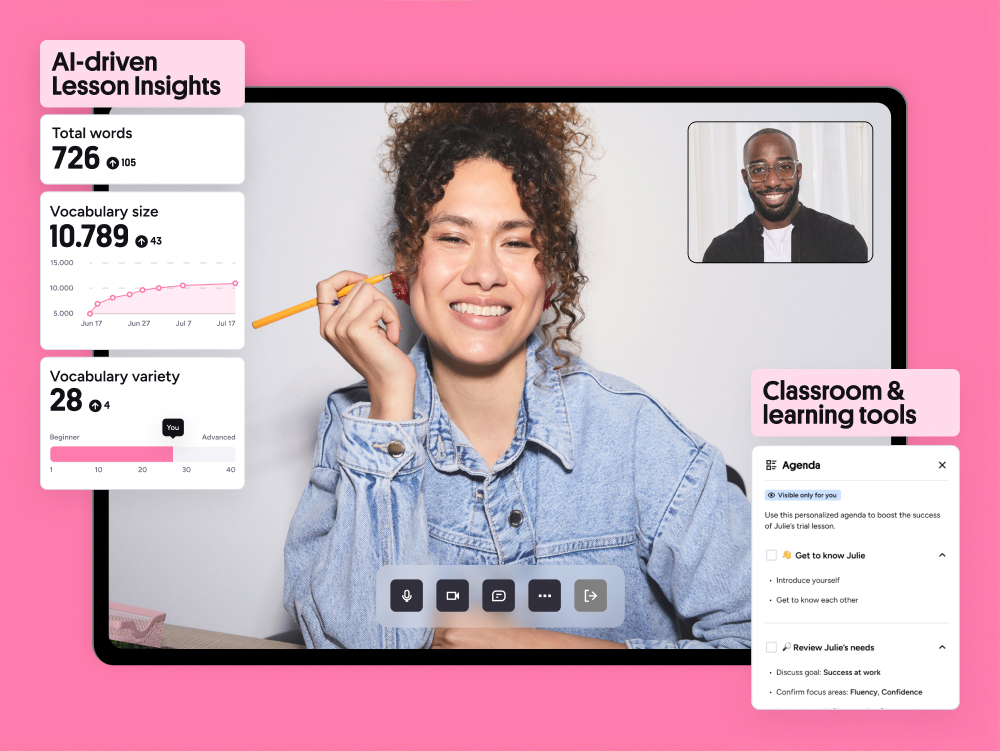
The mobile classroom includes a shared whiteboard, file sharing, and chat. For Spanish, the whiteboard is useful for writing verb conjugations, mapping sentence structure, or practicing spelling. Some tutors share PDF worksheets or screen-share textbook pages. The app stores lesson history, so you can revisit notes and vocabulary lists later.
Tracking Progress Over Time
Preply's progress dashboard shows total hours studied, lessons completed, and a self-assessment slider for speaking, listening, reading, and writing. Tutors can add private notes after each lesson — visible only to you — summarizing what was covered, vocabulary introduced, and homework assigned. This creates a searchable log of your learning journey.
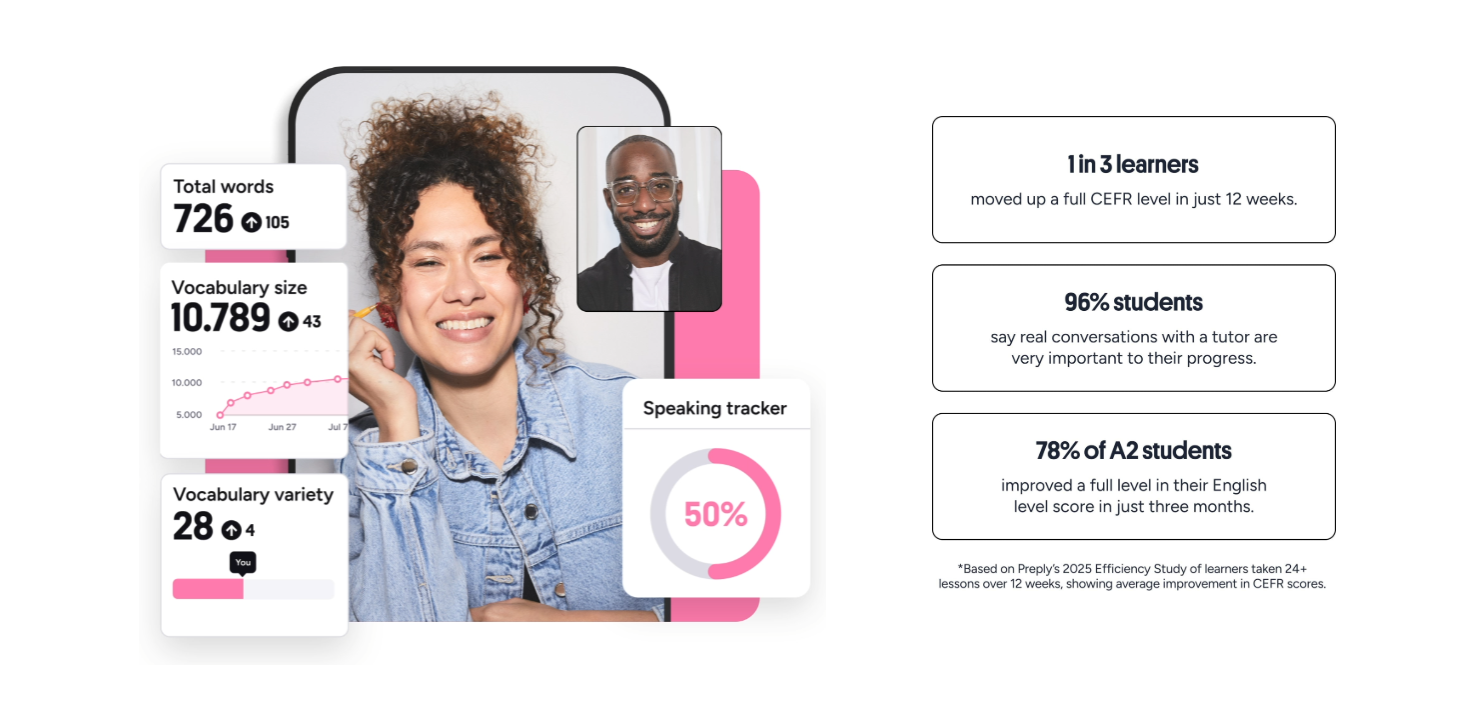
The dashboard is not a standardized proficiency test; it relies on your own rating and the tutor's subjective notes. For official certification, you still need DELE or SIELE exams. However, the log helps you see patterns — e.g., speaking improves faster than writing — and adjust focus with your tutor.
Preply for Business Spanish Training
Preply Business offers team accounts with centralized billing, admin dashboards, and reporting. Companies can assign learning budgets, track employee progress, and curate tutor pools for specific industries. The platform supports group lessons (up to 6 participants) and custom curriculum design. This is separate from the individual marketplace and requires a sales conversation for pricing.
- Admin dashboard: monitor usage, completion rates, and skill growth across the team.
- Single invoice: monthly billing for all employees instead of individual receipts.
- Dedicated success manager: helps match tutors to business goals (e.g., sales calls in Spanish).
- Group classes: cost-effective for onboarding multiple employees at similar levels.
For individual professionals, the regular marketplace works fine. Business features matter only when you need oversight, reporting, or volume discounts.
Common Challenges and How to Address Them
No platform is perfect. Preply users frequently mention a few friction points. Knowing them upfront helps you navigate or avoid them.
- Tutor turnover: popular tutors raise rates or leave the platform. Book a few lessons ahead if you find a good match.
- Time zone confusion: the platform shows tutor availability in your local time, but daylight saving changes can shift slots. Confirm the next lesson time in chat.
- Subscription rigidity: if you miss a week, you lose that lesson. Use the pause feature or reschedule early.
- Variable teaching quality: because anyone can apply to teach, some tutors lack formal training. Filter for certifications and read recent reviews carefully.
- Platform fees: the commission is built into rates, so you pay more than you would hiring a tutor directly. The trade-off is convenience, payment protection, and dispute resolution.
Most issues are manageable with clear communication. Treat the tutor relationship like any professional service: set expectations, give feedback, and switch if it's not working.
Alternatives to Preply for Spanish Learning
Preply is not the only option. Depending on your budget, learning style, and goals, other platforms may fit better.
Scroll horizontally to see all columns
| Platform | Model | Best For |
|---|---|---|
| italki | Marketplace, similar to Preply but larger tutor pool | Learners wanting maximum choice and community features |
| Verbling | Marketplace with stricter tutor vetting | Quality-focused learners willing to pay slightly higher rates |
| Baselang | Unlimited monthly subscription for daily lessons | Intensive learners who want daily practice at fixed cost |
| Lingoda | Structured group classes with fixed curriculum | Learners who prefer classroom format and CEFR-aligned levels |
| Duolingo / Babbel | Self-paced app with gamified exercises | Beginners building vocabulary and grammar foundations cheaply |
Each alternative has trade-offs. italki offers more tutors but a similar marketplace model. Baselang removes per-lesson decisions but requires daily commitment. Lingoda gives structure but less flexibility. Many learners combine a self-study app with a weekly tutor session on Preply or italki.
The platform is a tool, not a method. Your progress depends on how deliberately you use it.
Final Assessment of Preply Spanish Tutors
Preply works well for learners who know what they want and can articulate it. The marketplace size means you can find a tutor for almost any niche — DELE prep, Rioplatense accent, medical terminology — often within your budget and time zone. The subscription model encourages regularity, which is the single biggest factor in language acquisition. The app and progress tracking add convenience but are not game-changers on their own.
The main drawbacks are the lack of standardized teaching quality, the non-rollover lesson policy, and the platform commission that inflates rates compared to direct hiring. If you prefer a guided curriculum with built-in assessments, a structured course platform may serve you better. If you value choice, flexibility, and direct human interaction, Preply is a solid starting point. Book two or three trials, pick the tutor who listens and adapts, then commit to a consistent schedule for at least three months before evaluating results.
Frequently Asked Questions
How much do Preply Spanish tutors typically charge?
Rates range from about $5 to $40 per hour. Most experienced tutors with certifications fall between $12 and $25. Trial lessons are usually half the regular rate.
Can I switch tutors after starting a subscription?
Yes. You can cancel your current subscription and start a new one with a different tutor. Unused lessons in the current cycle are forfeited, so time the switch near your renewal date.
Does Preply offer a Spanish level test?
Preply has a free Spanish placement test that gives a rough CEFR estimate. It is not an official certification but helps you and your tutor set a starting point.
Are lessons recorded for later review?
Preply does not automatically record lessons. You can use third-party screen recording software if both parties agree, but check local recording laws first.
What happens if my tutor cancels a lesson?
If a tutor cancels, the lesson credit returns to your subscription. You can reschedule with the same tutor or book a different one. Repeated tutor cancellations may qualify for a refund via support.
Is Preply suitable for complete beginners in Spanish?
Yes. Many tutors specialize in teaching from zero. Look for tags like "Spanish for beginners" and filter for tutors who speak your native language to ease early communication.
Can I use Preply on a tablet or phone without a computer?
Fully. The iOS and Android apps support video lessons, whiteboard, chat, and file sharing. A stable internet connection and a quiet environment are the only requirements.