

Online Tutoring
Preply Computer Science Tutors: Find Your Ideal Coding Mentor
A practical guide to choosing the right computer science tutor on Preply for your learning goals.
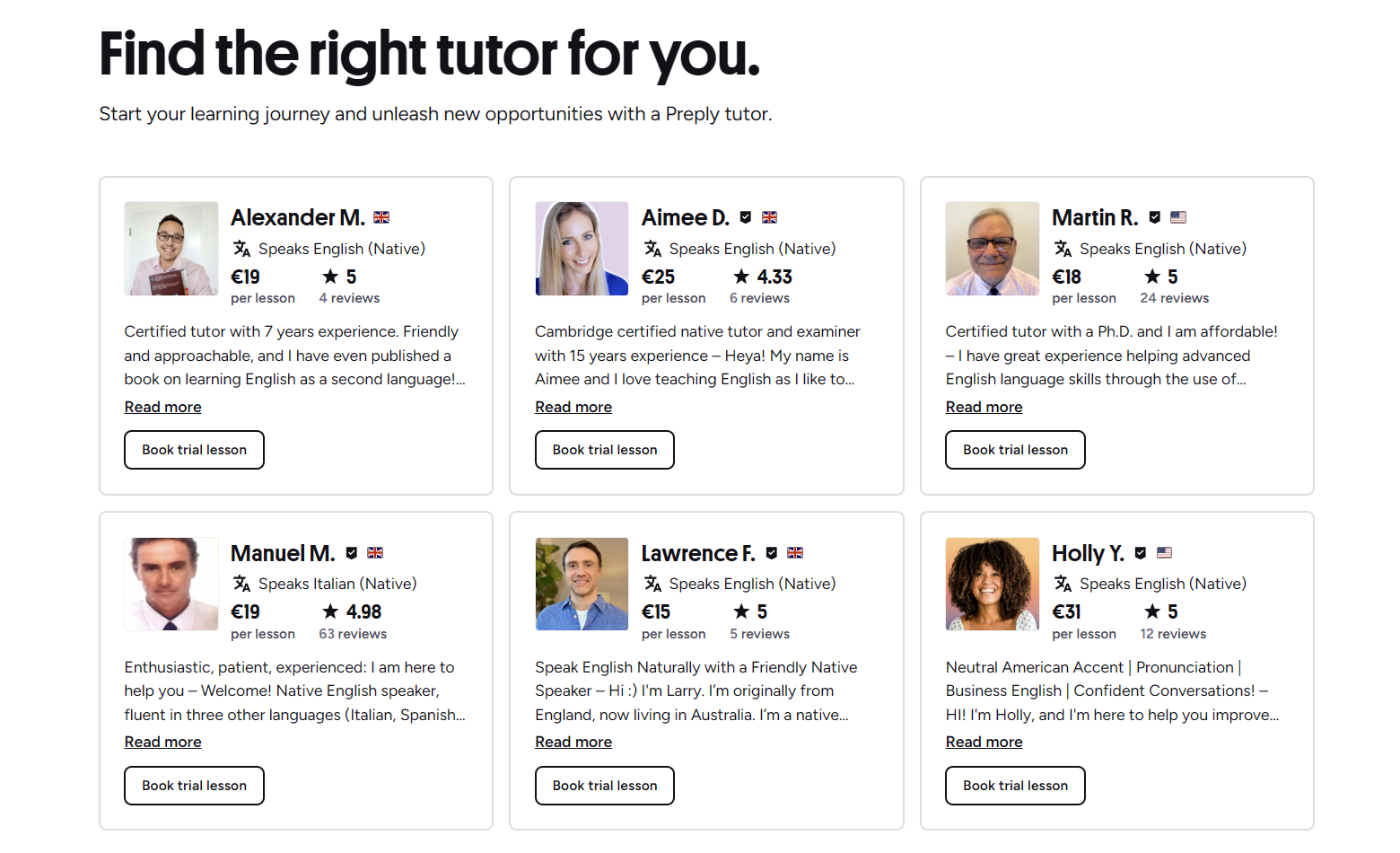
Finding a computer science tutor who actually understands your goals can feel like searching for a specific algorithm in an unsorted list. Preply's platform connects learners with tutors across dozens of programming languages and CS specializations, but the sheer number of profiles makes the choice overwhelming. This guide breaks down how to navigate the marketplace, what signals indicate a good fit, and where the platform helps or falls short for technical subjects.
Contents
- 1. How Preply Connects You with Computer Science Tutors
- 2. What to Look for in a Computer Science Tutor
- 3. Popular Programming Languages and Topics Covered
- 4. Setting Up Your First Lesson on Preply
- 5. Pricing and Subscription Options for Computer Science Lessons
- 6. Using the Preply Platform for Technical Learning
- 7. Tracking Progress in Computer Science Studies
- 8. Preply for Business: Team Coding Training
- 9. Comparing Preply with Other Tutoring Platforms
- 10. Common Pitfalls and How to Avoid Them
- 11. Maximizing Value from Each Session
- 12. When to Switch Tutors
- 13. Final Assessment of Preply Computer Science Tutors
Unlike language tutoring where conversation flow is the main metric, computer science lessons need code review, debugging sessions, and conceptual explanations that match your current project or coursework. Preply's filter system lets you narrow by language, price, availability, and tutor rating, yet the most useful signals often live in the details: whether a tutor has industry experience in the stack you're learning, how they structure homework, and whether they offer trial lessons that reveal their teaching style before you commit.
The platform's origins in language learning mean some features feel optimized for vocabulary drills rather than pair programming. Still, the video classroom supports screen sharing and a collaborative whiteboard, which are essential for walking through data structures or reviewing pull requests. Understanding these constraints upfront saves time and helps you set realistic expectations for what a weekly session can achieve.
How Preply Connects You with Computer Science Tutors
The matching flow starts with a short questionnaire about your goals, preferred languages, and schedule. Preply then surfaces a ranked list of tutors who match those filters. You can further sort by rating, price per hour, response time, and whether the tutor offers a trial lesson. Each profile shows a video introduction, student reviews, a calendar of available slots, and a list of declared specializations such as Python, Java, algorithms, or machine learning.
- Filter by programming language, framework, or CS topic
- Sort by hourly rate, rating, or availability
- Watch tutor introduction videos before booking
- Read verified student reviews with lesson context
- Book a 25-minute or 50-minute trial lesson
One practical tip: use the "specialization" tags as a starting point, but verify the tutor's actual experience in the description and reviews. A tutor tagged "Python" might focus on web scraping while you need help with pandas for data analysis. The review snippets often reveal the tutor's real strengths because students mention specific projects or exam prep they worked on together.
After you select a tutor, the booking flow asks for your time zone and preferred lesson length. Preply handles the calendar conversion automatically, which removes a common friction point when working with tutors across continents. You can also message tutors before booking to ask about their approach to a specific topic, though response times vary.
What to Look for in a Computer Science Tutor
A strong CS tutor profile goes beyond a list of languages. Look for concrete teaching experience: university TA roles, bootcamp instruction, or mentoring junior developers. Industry background matters if you want real-world context — someone who has shipped production code can explain why certain patterns matter beyond passing a test case. Check whether the tutor mentions a structured curriculum or adapts each session to your immediate questions.
Reviews are the most reliable signal. Filter for students who mention the same language or concept you're studying. A tutor with fifty five-star reviews for conversational English may have zero experience explaining recursion or time complexity. Pay attention to review length — detailed accounts of how a tutor helped debug a segmentation fault or design a database schema carry more weight than generic praise.
Popular Programming Languages and Topics Covered
Preply's tutor pool covers the full spectrum from introductory programming to specialized domains. Python and JavaScript dominate the listings because they are common entry points, but you can also find tutors for C++, Java, Go, Rust, and functional languages like Haskell. Beyond syntax, tutors offer help with algorithms, data structures, system design, databases, and interview preparation for FAANG-style coding rounds.
Scroll horizontally to see all columns
| Topic | Tutor Density | Typical Price Range |
|---|---|---|
| Python basics | High | $15–$35/hr |
| JavaScript/React | High | $20–$45/hr |
| Algorithms & DS | Medium | $25–$50/hr |
| Machine Learning | Medium | $30–$60/hr |
| System Design | Low | $40–$80/hr |
| Rust/Go | Low | $30–$55/hr |
The density column reflects how many tutors list that topic as a primary specialization. High density means more choice and competitive pricing, but also more variation in quality. Low-density topics like system design often attract senior engineers who charge a premium. If your budget is tight, consider grouping related topics — many Python tutors also teach pandas, NumPy, and basic ML workflows in the same hourly rate.
Setting Up Your First Lesson on Preply
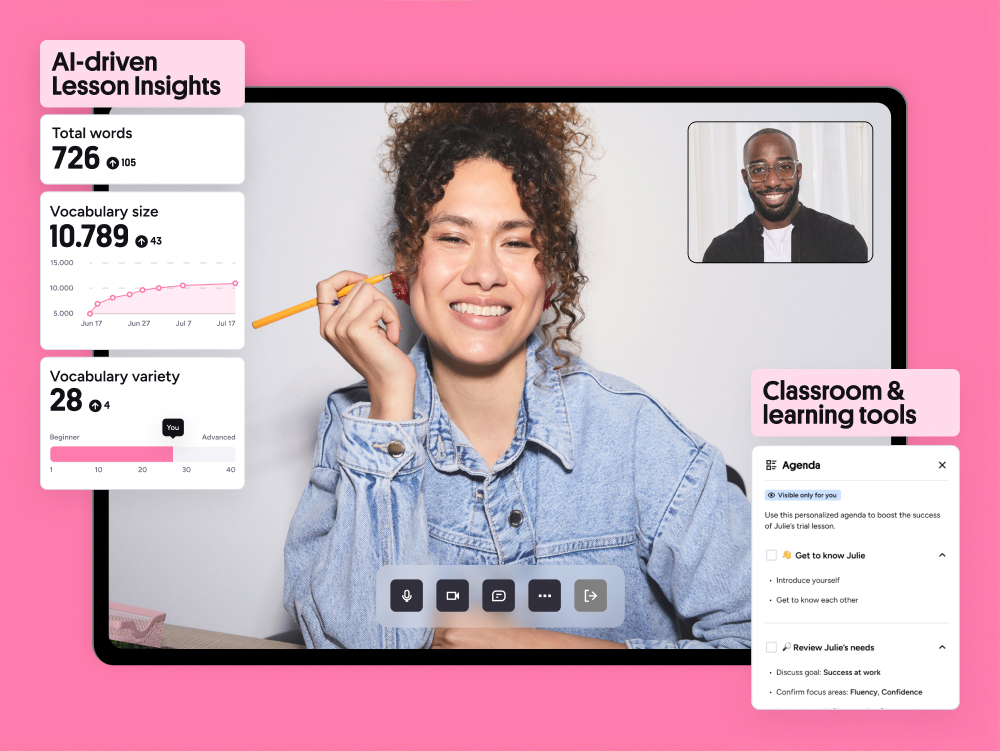
Once you book a trial, you'll enter the Preply classroom at the scheduled time. The interface works in browser — no separate download required — and includes video, chat, a shared whiteboard, and screen sharing. For coding sessions, screen sharing is the primary tool. Have your IDE open, the relevant files ready, and a clear question or goal for the session. Tutors appreciate when students come prepared because it maximizes the paid time.
- Test your microphone and camera 10 minutes before
- Share your screen with the specific window, not the whole desktop
- Have a GitHub repo or code snippet ready to discuss
- Write down 2–3 specific questions in advance
- Ask the tutor to record the session if the platform allows
The trial lesson is your chance to evaluate the tutor's communication style. Do they explain concepts at the right abstraction level? Can they switch between high-level architecture and line-by-line debugging? Do they encourage you to type, or do they take over the keyboard? A good CS tutor lets you drive while offering guardrails. If the trial feels like a lecture, that pattern usually continues.
After the trial, you decide whether to purchase a package of hours. Preply sells lesson credits in bundles — 5, 10, 15, or 20 hours — which lock in the tutor's current rate. If the tutor raises prices later, your package remains at the original rate until you use the credits. This can be a hedge against price increases, but it also commits you to that tutor. Monthly subscriptions are an alternative that auto-renew and offer a slight discount per hour.
Pricing and Subscription Options for Computer Science Lessons
Hourly rates for CS tutors typically range from $15 to $80, with most clustering between $20 and $45. Tutors set their own prices, and Preply takes a commission that decreases as the tutor completes more lessons on the platform. The commission structure means newer tutors sometimes charge less to build reviews, while established tutors with hundreds of lessons command higher rates. There are no platform fees for students beyond the tutor's listed price.
Scroll horizontally to see all columns
| Package | Hours | Discount vs Single |
|---|---|---|
| Starter | 5 hours | 0% |
| Regular | 10 hours | 5% |
| Intensive | 15 hours | 8% |
| Committed | 20 hours | 12% |
Subscriptions renew monthly and let you roll over unused hours to the next month, up to a cap. This flexibility suits learners with variable schedules. However, if you pause the subscription, you lose the rollover benefit. Packages do not expire for 12 months, which is safer if you anticipate breaks. Refunds for unused package hours are possible but require contacting support and may be prorated based on the single-lesson rate.
Using the Preply Platform for Technical Learning
The classroom tools are functional but not specialized for code. There is no built-in IDE, REPL, or version control integration. You share your screen and work in your local environment or a cloud IDE like Replit or GitHub Codespaces. The whiteboard is useful for drawing architecture diagrams or stepping through algorithm logic, but it lacks syntax highlighting. Most tutors and students rely on screen share plus a shared Google Doc or Notion page for notes.
Preply's mobile app mirrors the browser experience. You can join lessons from a phone or tablet, though coding on a small screen is impractical. The app shines for reviewing flashcards, checking upcoming lessons, and messaging tutors between sessions. Notifications for lesson reminders and tutor messages are reliable on both iOS and Android.

One platform limitation: file sharing in chat is limited to images and PDFs. You cannot send code files directly through Preply chat. Workarounds include pasting snippets in chat, using a shared GitHub gist, or uploading to a cloud drive and sharing the link. This friction is minor but worth knowing if you plan to exchange starter code or review assignments frequently.
Tracking Progress in Computer Science Studies
Preply provides a progress dashboard that shows completed lessons, hours used, and a self-assessment slider for confidence in the subject. For language learning, this works well. For computer science, the metrics are less meaningful because progress is project-based rather than linear. A better approach is to set concrete milestones with your tutor: complete a specific LeetCode problem set, build a REST API, or pass a practice exam.
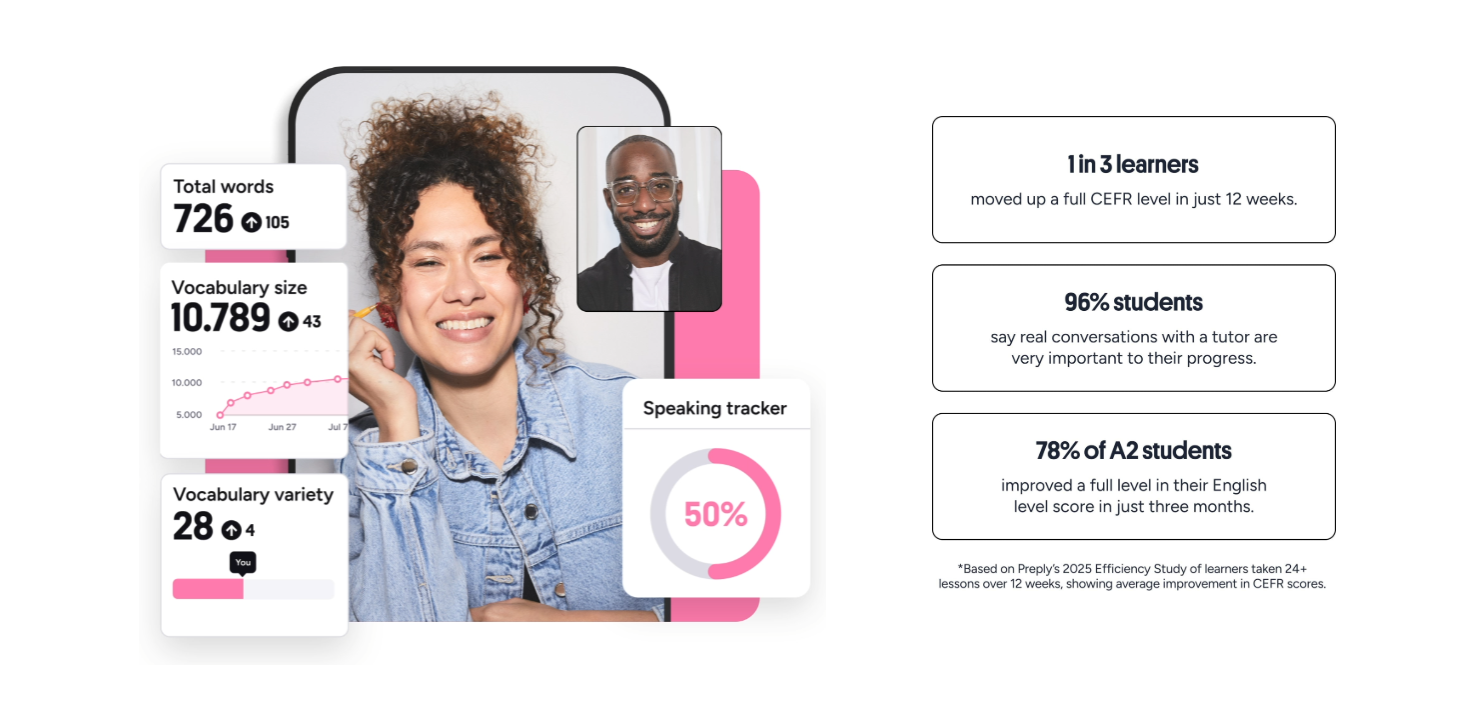
Some tutors create shared Notion boards or Trello cards to track topics covered, homework assigned, and concepts mastered. This external tracking compensates for the platform's generic progress view. If your tutor doesn't offer a tracking system, propose one. A simple spreadsheet with columns for date, topic, resources, and next steps keeps both parties aligned and makes it easy to review before exams or interviews.
Preply for Business: Team Coding Training
Preply's business tier lets companies purchase seat licenses for employee upskilling. The admin dashboard shows team usage, skill gaps, and spending. For engineering teams, this can fund targeted training — React for frontend devs, Kubernetes for platform engineers, or Python for data analysts. Tutors can be filtered for corporate training experience, and some offer group workshops in addition to 1-on-1 lessons.
The business model uses a per-seat subscription with volume discounts. Companies set learning budgets per employee, and learners choose tutors within that budget. Reporting includes completion rates and satisfaction scores. One limitation: the tutor pool for advanced enterprise topics (e.g., legacy mainframe migration, specialized embedded systems) is thinner than for mainstream web stacks. Planning ahead and booking recurring slots with the same tutor mitigates availability risk.
Comparing Preply with Other Tutoring Platforms
Preply competes with Wyzant, CodeMentor, and specialized platforms like MentorCruise. Wyzant has a stronger US-based tutor base and background checks, but higher average rates. CodeMentor focuses exclusively on software development and offers on-demand 15-minute sessions for quick debugging help — a model Preply does not support. MentorCruise curates mentors for long-term career coaching rather than hourly tutoring. Preply's advantage is global tutor availability across time zones and a lower entry price point.

Scroll horizontally to see all columns
| Platform | Focus | Pricing Model | Best For |
|---|---|---|---|
| Preply | General + CS | Hourly packages / subscription | Flexible schedule, global tutors |
| Wyzant | Academic + CS | Pay per lesson | US-based, background-checked tutors |
| CodeMentor | Software dev only | Per minute / monthly | On-demand debugging help |
| MentorCruise | Career mentorship | Monthly subscription | Long-term career guidance |
If you need a quick answer to a specific bug, CodeMentor's per-minute model can be cheaper than booking an hour on Preply. If you want a consistent weekly mentor for a semester-long course, Preply's package pricing and scheduling tools work well. For career transitions, MentorCruise's vetted mentors with hiring experience at target companies provide a different value proposition. Many learners use multiple platforms for different needs.
The platform matters less than the tutor. A great teacher on any platform beats a mediocre one on the 'best' platform.
Common Pitfalls and How to Avoid Them
The most frequent complaint from CS students on Preply is mismatch between the tutor's advertised expertise and their actual ability to teach a specific topic. This happens because tutors tag every language they've ever touched. The fix is simple: message before booking. Ask for a concrete example of how they've taught the exact concept you need. If they can't describe a recent student project involving that topic, keep looking.
- Over-reliance on tags — verify with a pre-booking message
- Booking large packages before a trial — start with 5 hours max
- Ignoring time zone overlap — confirm recurring slot viability
- Skipping homework — progress stalls without practice between sessions
- Accepting passive lectures — insist on hands-on coding time
Another pitfall is treating tutoring as a replacement for self-study. A tutor can unblock you, explain a tricky concept, and review your code, but they cannot write your assignments or internalize patterns for you. The learners who get the most value treat sessions as checkpoints: they struggle with the material alone first, bring specific questions, and use the tutor to validate or correct their understanding.
Maximizing Value from Each Session
Preparation determines ROI. Spend 30 minutes before each lesson reproducing the bug, writing the failing test, or outlining the design problem. Share that context in the chat when the lesson starts. This lets the tutor skip orientation and dive into the hard part. After the session, spend 15 minutes implementing the suggested changes while they're fresh. The cycle of struggle → session → immediate practice builds retention far better than passive watching.
Record sessions if your tutor agrees. Preply does not have a built-in recorder, but OBS or the OS screen recorder works. Having a video reference lets you revisit the explanation of a complex algorithm weeks later. Label recordings with date and topic. Over a semester, you build a personal library of explained concepts tailored to your learning gaps.
The best sessions feel like pair programming with a senior colleague who asks better questions than you do.
When to Switch Tutors
Switching is normal. Your needs evolve: you might start with Python basics, then need help with Django, then move to system design for interviews. A tutor strong in one area may be weak in another. Preply makes switching easy — unused package hours can be applied to a different tutor, though you may need to contact support if the new tutor's rate is higher. Don't stay with a mismatch out of sunk-cost loyalty; the opportunity cost of slow progress is higher than the friction of changing.
Signs it's time to switch: you leave sessions more confused than when you started, the tutor repeatedly cancels, they cannot answer follow-up questions without researching offline, or they dominate the keyboard. A good tutor adapts to your pace. If you're consistently doing the mental heavy lifting while they watch, the dynamic is inverted.
Frequently Asked Questions
How do I verify a tutor's computer science expertise before booking?
Check their specialization tags, read reviews from students who studied the same topic, and message them with a specific question about your target concept. A qualified tutor will give a concrete example of how they've taught it recently.
Can I use Preply for coding interview preparation?
Yes. Many tutors specialize in LeetCode patterns, system design mock interviews, and behavioral prep. Filter for 'interview preparation' or 'algorithms' and look for reviews mentioning FAANG or specific company interviews.
What happens if my tutor cancels a lesson?
Preply's policy returns the lesson credit to your balance if the tutor cancels. You can rebook with the same tutor or choose another. If cancellations become a pattern, request a tutor change through support.
Are there tutors for advanced topics like distributed systems or compiler design?
They exist but are rarer. Search for specific keywords and expect higher rates ($50–$100/hr). You may need to book further in advance due to limited availability.
Can I get a refund if I'm not satisfied with a tutor?
Preply offers a satisfaction guarantee on the first lesson with a new tutor. If unsatisfied, you can request a free replacement lesson with another tutor or a refund of that lesson's cost. Package refunds for unused hours are handled case by case.
Does Preply support group coding lessons for teams?
The business tier supports group sessions. Some tutors offer workshops for 3–10 participants. Contact Preply sales for custom team training arrangements.
What equipment do I need for effective coding lessons?
A stable internet connection, a decent microphone, and a screen large enough to read code while sharing. A second monitor helps — one for the video call, one for your IDE. Headphones reduce echo.
Final Assessment of Preply Computer Science Tutors
Preply works for computer science tutoring when you treat it as a marketplace, not a curriculum. The platform gives you access to a global pool of practitioners, but the burden of vetting, structuring, and driving progress falls on you. For self-directed learners who know what they need — a weekly algorithm review, a debugging partner for a side project, interview drills — the flexibility and price range are hard to beat. For those expecting a guided course with built-in accountability, the generic progress tools and lack of standardized CS pedagogy will feel lacking. The sweet spot is a motivated student with a clear short-term goal who uses the trial system to find a tutor that matches their learning style, then commits to a package with explicit milestones. If that describes you, Preply is a practical tool. If not, consider a structured bootcamp or university extension course instead.