

Online Tutoring
Preply Math Tutors: Find the Right Match for Any Level
Everything you need to know before booking your first math session on Preply.
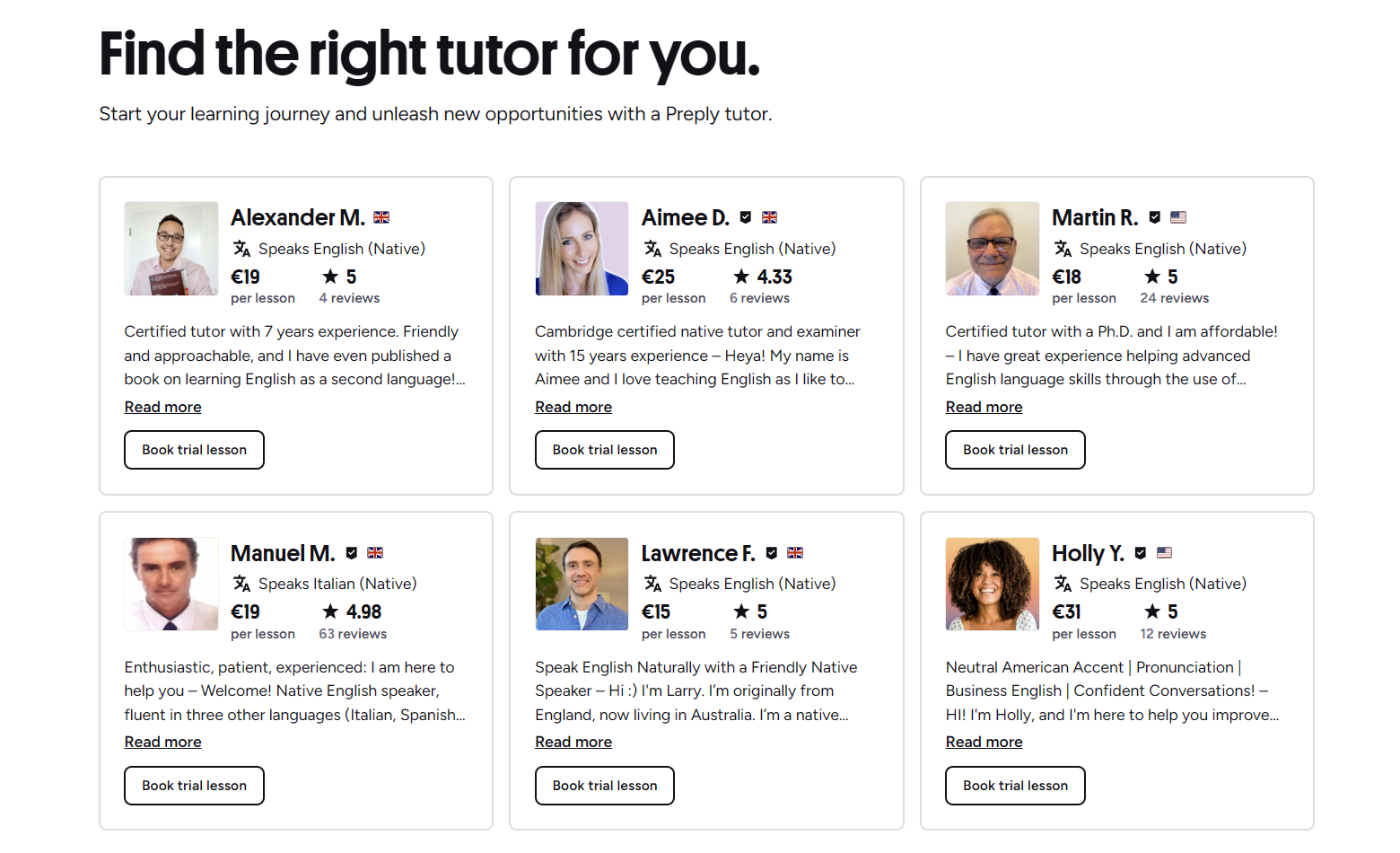
Preply has grown into one of the largest tutor marketplaces online, and its math section is one of the most active categories on the platform. Students from elementary school through university — plus adults brushing up on skills — use it to find instructors who match their schedule, budget, and learning style. This article breaks down how the math side of Preply works, what it costs, what the experience feels like, and where it falls short.
Contents
- 1. How the Tutor Search Works
- 2. Pricing Structure and Subscription Model
- 3. The Video Classroom Experience
- 4. Progress Tracking and Learning Plans
- 5. Types of Math Tutors You Will Encounter
- 6. Reading Reviews Critically
- 7. Scheduling and Time Zone Handling
- 8. Mobile and Desktop Apps
- 9. Preply for Business and Teams
- 10. Common Pain Points and Workarounds
- 11. Comparing Preply to Alternatives
- 12. Tips for a Productive First Month
- 13. Refunds, Disputes, and Support
- 14. Accessibility and Language Options
- 15. Data Privacy and Security
- 16. Who Should Consider Preply for Math
- 17. Final Assessment of Preply Math Tutors
The platform does not employ tutors directly. Instead, it provides the search tools, video classroom, scheduling, and payment infrastructure. Tutors set their own rates, write their own profiles, and decide how they teach. That model creates variety — some tutors follow a strict curriculum, others improvise around the student's homework — but it also means quality can vary widely. Knowing how to evaluate profiles is the single most useful skill for a new user.
How the Tutor Search Works
Preply's search filters let you narrow by subject, price range, availability, tutor nationality, and languages spoken. For math, you can also filter by level: elementary, middle school, high school, college, test prep (SAT, ACT, GRE, GMAT), and competition math (AMC, Olympiad). Each tutor profile shows an hourly rate, a short video introduction, a written bio, education credentials, and reviews from previous students.
- Use the "Specialties" tags to find tutors who explicitly list calculus, linear algebra, statistics, or discrete math.
- Sort by "Rating" or "Number of reviews" to surface tutors with a track record.
- Check the "Response time" badge — tutors who reply within an hour tend to be more organized.
- Book a trial lesson (usually 25 or 50 minutes) before committing to a package.
Trial lessons are not free on Preply; they are paid at the tutor's regular hourly rate. However, Preply offers a satisfaction guarantee: if you are not happy after the first lesson with a new tutor, you can request a free replacement lesson with another tutor. The guarantee applies once per student.
Pricing Structure and Subscription Model
Tutors set hourly rates anywhere from $5 to over $100. The median for qualified math tutors sits between $15 and $35 per hour. Preply takes a commission that starts at 33% for the first few lessons with a new student and drops to 18% after the tutor has earned a certain amount from that student. The commission is baked into the price you see — you do not pay extra fees on top.
Scroll horizontally to see all columns
| Level | Low End | Median | High End |
|---|---|---|---|
| Elementary / Middle School | $5 | $12 | $25 |
| High School (Algebra, Geometry) | $8 | $18 | $40 |
| College (Calculus, Linear Algebra) | $12 | $25 | $60 |
| Test Prep (SAT, GRE, GMAT) | $15 | $30 | $80 |
| Competition / Olympiad | $20 | $40 | $100+ |
Lessons are purchased in packages of 5, 10, 15, or 20 hours. Buying a larger package unlocks a small discount (usually 5–10%). Unused hours expire after 12 months. You can also enable auto-renewal so the package replenishes when it runs low. Cancellation policy: you must cancel or reschedule at least 4 hours before the lesson to avoid being charged. Tutors can set stricter windows, so check the profile.
The Video Classroom Experience
Preply's built-in video tool runs in the browser — no Zoom or Skype required. It includes a shared whiteboard, file upload, screen sharing, and a chat sidebar. The whiteboard supports basic drawing, text boxes, and image paste. For math, the whiteboard is the main workspace. Some tutors also use external tools like Desmos, GeoGebra, or a shared Google Doc, but they have to screen-share those.
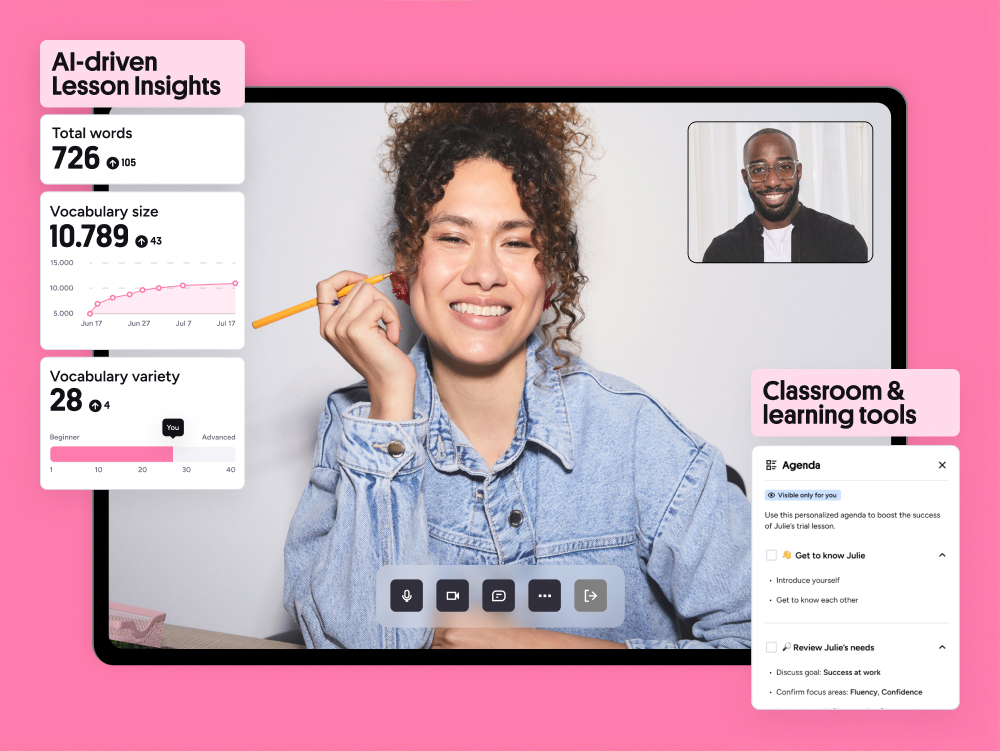

Connection quality depends on both parties' internet. The platform adjusts video resolution automatically. In practice, audio dropouts are rare, but the whiteboard can lag if both people draw simultaneously. A wired connection helps. Lessons can be recorded if both parties consent; recordings stay in your Preply account for 30 days.
Progress Tracking and Learning Plans
Preply added a progress dashboard that shows lesson count, total hours, topics covered, and a self-assessment slider the student updates after each session. Tutors can write short lesson notes that appear in the dashboard. The system also suggests a learning plan based on the student's stated goals (e.g., "Pass Calculus I" or "Improve SAT Math score by 100 points").
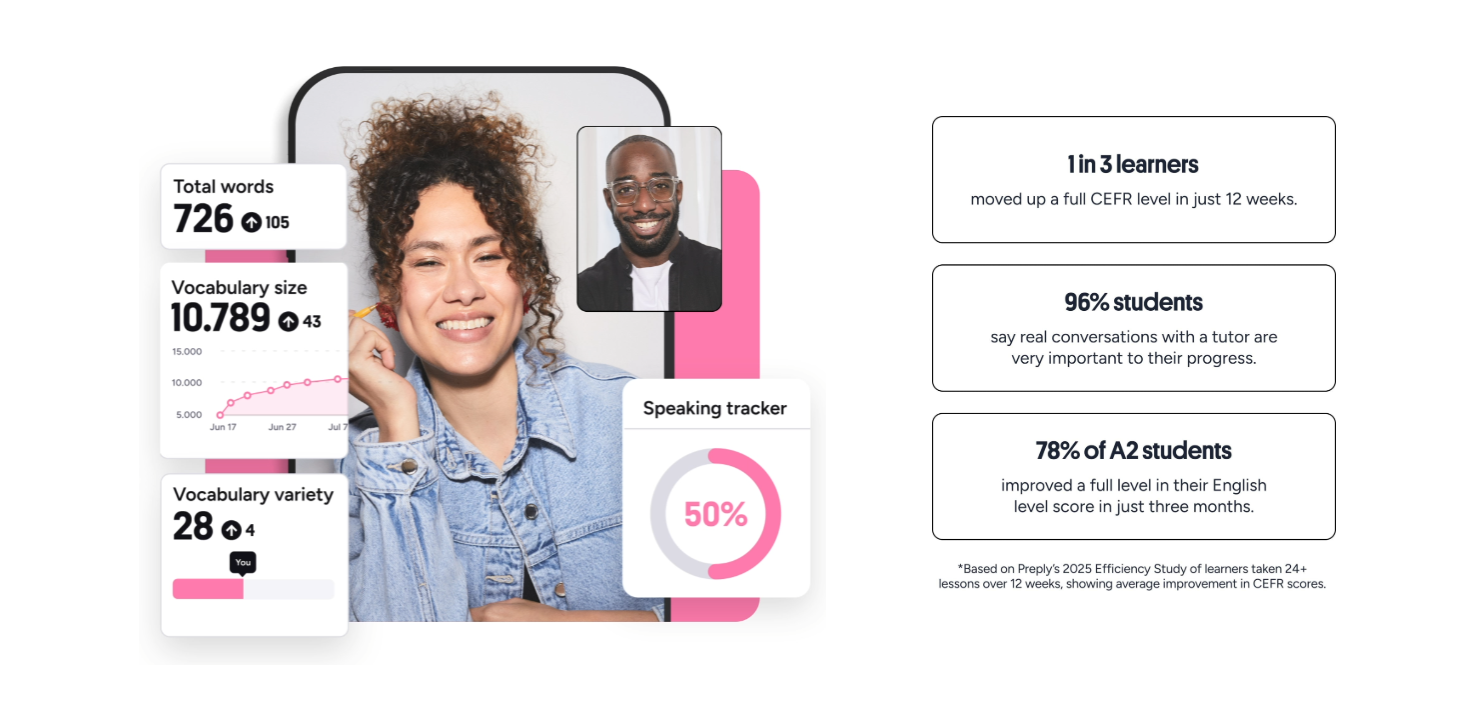
The learning plan is a simple list of milestones — not a detailed curriculum. It works best when the tutor and student review it together every few weeks. Some tutors ignore it entirely and follow their own syllabus. If you want structure, ask the tutor during the trial how they use the plan.
Types of Math Tutors You Will Encounter
Because anyone can apply to teach on Preply, the tutor pool mixes certified teachers, graduate students, engineers, and hobbyists. The platform verifies identity and education documents for a "Verified" badge, but it does not audit teaching ability. Here are the common archetypes:
- Classroom teachers — often have state certification, follow standard curricula, good for school-aligned support.
- University students / recent grads — strong on current coursework, cheaper, schedule may shift each semester.
- Industry professionals (engineers, data scientists) — excellent for applied math, statistics, programming-adjacent topics; may lack pedagogy training.
- Test-prep specialists — focus on SAT, ACT, GRE, GMAT; usually teach strategies and timed practice.
- Competition coaches — former Olympiad participants; niche, expensive, high demand.
Reading Reviews Critically
Preply reviews are left after a lesson package completes. They are generally positive — the median rating across the platform is 4.9/5. That inflation makes it hard to differentiate. Look for reviews that mention specific outcomes: "Helped me raise my calculus grade from C to A in six weeks" or "Explained linear algebra proofs in a way that finally clicked." Generic praise ("Great tutor!") is less useful.
A tutor with fifty 5-star reviews that all say "nice person" tells you less than one review that says "fixed my misunderstanding of epsilon-delta proofs in two sessions."
Also check the review dates. A tutor who was active two years ago but has no recent reviews may have left the platform or changed their schedule. Preply shows the last active date on the profile.
Scheduling and Time Zone Handling
The calendar displays slots in your local time zone. Tutors set availability in their own zone; the conversion is automatic. You can book recurring weekly slots or one-off lessons. If a tutor cancels, you get a full credit refund instantly. If you cancel within the 4-hour window, the lesson is deducted from your package.
- Set your time zone correctly in account settings — mismatches cause missed lessons.
- Recurring slots reserve the same time each week; you can pause or cancel the series anytime.
- Tutors often block out holidays; check the calendar a month ahead if you need consistency.
Mobile and Desktop Apps
Preply offers iOS and Android apps that mirror the web experience: search, booking, video lessons, chat, and progress tracking. The mobile whiteboard is usable with a finger or stylus, but drawing precise graphs on a phone screen is frustrating. Tablets work better. The desktop app (Electron wrapper) adds system notifications and a dedicated window but no exclusive features.

Push notifications for upcoming lessons and tutor messages are reliable. Offline mode is not supported — you need an active connection for the video classroom. Chat history syncs across devices.
Preply for Business and Teams
Preply Business lets companies purchase seat licenses for employees. The admin dashboard tracks usage, progress, and spending. Math tutoring is less common in corporate plans than language training, but some firms use it for data-analysis upskilling (statistics, Python for analytics). Pricing is custom; expect volume discounts starting around 10 seats.
Common Pain Points and Workarounds
No platform is perfect. The most frequent complaints from math students on Preply fall into a few categories:
- Tutor no-shows — rare but happen. Preply refunds the lesson credit automatically if the tutor misses without notice.
- Whiteboard limitations — no LaTeX rendering, no equation editor. Workaround: type equations in chat using plain text (e.g., \int_0^1 x^2 dx) or use an external shared editor.
- Package expiration — 12 months is generous, but if you pause for a semester you can lose hours. Workaround: schedule a dummy lesson before expiry to reset the clock, or contact support for an extension.
- Commission opacity — students never see the tutor's net pay. Some tutors raise rates to offset commission, making the platform pricier than direct arrangements.
The whiteboard is fine for arithmetic and algebra. Once you hit multivariable calculus or proof-based linear algebra, you will want a shared LaTeX editor or a tablet with a stylus.
Comparing Preply to Alternatives
Preply sits between two poles: free resources (Khan Academy, YouTube, Paul's Online Math Notes) and premium live-instruction services (Wyzant, Varsity Tutors, Chegg Tutors). Khan Academy is excellent for self-paced concept videos and practice exercises but offers no human feedback. Wyzant and Varsity Tutors vet tutors more aggressively and charge higher rates ($40–$100+/hr). Preply's advantage is volume and price flexibility; its disadvantage is inconsistent vetting.
Scroll horizontally to see all columns
| Platform | Typical Rate | Vetting | Best For |
|---|---|---|---|
| Preply | $15–$35/hr | Identity + degree verification only | Budget-conscious, flexible scheduling, wide tutor pool |
| Wyzant | $40–$80/hr | Background check, subject proficiency test | Students who want guaranteed qualifications |
| Varsity Tutors | $50–$100/hr | Rigorous screening, proprietary curriculum | Test prep, structured programs |
| Khan Academy | Free | N/A | Self-study, concept review, practice exercises |
Tips for a Productive First Month
If you decide to try Preply for math, a deliberate start saves money and frustration.
- Define a concrete goal: "Master integration techniques for Calculus II final" beats "Get better at calculus."
- Message 3–5 tutors before booking. Ask: "How do you structure a 50-minute session?" and "What materials do you use?"
- Book trial lessons with two different tutors. Compare teaching style, not just personality.
- After choosing a tutor, buy a 10-hour package (discount kicks in) and schedule weekly recurring slots.
- Share your syllabus, textbook, or past exams in the chat before the first paid lesson.
- Update the progress dashboard after each session — it forces reflection and gives the tutor data.
Refunds, Disputes, and Support
Preply's support team handles billing disputes, tutor misconduct reports, and technical issues. Response time is usually within 24 hours via chat or email. Refunds for unused package hours are possible only in exceptional cases (medical, tutor left platform). The satisfaction guarantee covers the first lesson with a new tutor — you get one free replacement lesson credit, not a cash refund.
If a tutor behaves unprofessionally (e.g., answers phone during lesson, uses AI to generate answers without explanation), report it with the lesson recording attached. Preply can suspend the tutor's account.
Accessibility and Language Options
The platform interface is available in 20+ languages. Many math tutors teach in English, but you can filter for tuters who speak Spanish, French, German, Portuguese, Russian, Arabic, Chinese, Japanese, Korean, and others. This is useful for students who prefer to learn math terminology in their native language while studying an English-language curriculum.
- Filter "Tutor speaks" to find bilingual instructors.
- Some tutors offer lessons entirely in the target language — good for CLIL (Content and Language Integrated Learning).
- Subtitles and closed captions are not built into the video tool; rely on tutor's spoken clarity.
Data Privacy and Security
Preply is GDPR-compliant. Personal data (name, email, payment info) is encrypted in transit and at rest. Lesson recordings are stored on Preply's servers for 30 days, then deleted. You can request full data export or deletion from account settings. Tutors see only your first name, profile photo, and chat history — not your email or payment details.
Who Should Consider Preply for Math
Preply works well for:
- K–12 students needing homework help or test prep on a budget.
- College students who want weekly reinforcement for a difficult course.
- Adults returning to math after a gap (GRE, career change, certification).
- Homeschool families looking for a la carte instruction.
- Learners who value schedule flexibility over institutional accreditation.
It is less suitable for:
- Students who need a rigid, accredited curriculum with grades.
- Learners who require specialized hardware (braille display, screen-reader optimized whiteboard).
- Anyone expecting a guaranteed outcome — no tutor can promise a specific score increase.
Frequently Asked Questions
How much does a typical Preply math tutor cost per hour?
Most qualified math tutors charge between $15 and $35 per hour. Elementary tutors can be under $15; specialized test-prep or competition coaches often exceed $50.
Can I get a refund if I don't like my tutor after the first lesson?
Preply offers a satisfaction guarantee: you receive one free replacement lesson credit with a different tutor. Cash refunds are not provided for the trial lesson.
Does Preply verify tutors' teaching ability?
Preply verifies identity and education credentials only. Teaching skill is not audited. Read recent reviews and watch the intro video to assess fit.
What equipment do I need for a Preply math lesson?
A computer or tablet with a webcam, microphone, and stable internet. A stylus or graphics tablet makes the whiteboard much easier for math notation.
Can I use Preply on my phone?
Yes, iOS and Android apps support the full video classroom and whiteboard, but a larger screen is recommended for math work.
Do unused lesson hours expire?
Package hours expire 12 months after purchase. Auto-renewal can extend them if enabled.
Is there a LaTeX or equation editor in the whiteboard?
No. The whiteboard supports freehand drawing and text only. Many tutors use screen-shared external tools like Desmos or Overleaf for complex notation.
Can I switch tutors mid-package?
Yes. Remaining hours stay in your account and can be used with any tutor. No penalty for switching.
Final Assessment of Preply Math Tutors
Preply's math marketplace delivers on its core promise: affordable, flexible access to a huge pool of tutors. The platform tools — search, scheduling, video classroom, progress dashboard — are competent and improving. The trade-off is variability. Because vetting stops at credentials, the burden of finding a great teacher falls on the student. If you are willing to message a few tutors, run paid trials, and manage your own learning plan, Preply is a cost-effective option. If you want a guaranteed, structured program with institutional oversight, look at Wyzant, Varsity Tutors, or a community college course. For most self-directed learners, Preply hits a practical sweet spot between free resources and premium services.