

Language Learning
How to Book a Lesson on Preply: Complete Guide
Learn the booking process, trial lessons, and subscription management on Preply
Booking a lesson on Preply starts with understanding how the platform connects students with tutors across dozens of languages and subjects. The process is designed to be straightforward, but knowing the details upfront saves time and helps you avoid common frustrations. This guide walks through every step from creating an account to confirming your first session.
Contents
- 1. Finding the Right Tutor Before Booking
- 2. Understanding Preply Trial Lessons
- 3. Step-by-Step Booking Process
- 4. Choosing Lesson Duration and Frequency
- 5. Payment Methods and Subscription Plans
- 6. Managing Your Schedule and Rescheduling
- 7. Using the Preply Mobile App for Booking
- 8. What Happens After You Book
- 9. Common Booking Issues and Solutions
- 10. Preply for Business: Team Booking
- 11. Progress Tracking and Lesson History
- 12. Final Assessment of Preply Lesson Booking
Preply operates as a marketplace rather than a traditional school. Tutors set their own rates, schedules, and teaching approaches. You are not locked into a single instructor or curriculum. That flexibility is the main draw, but it also means the booking experience varies depending on which tutor you choose and what type of lesson you want.
Most new users begin with a trial lesson. These reduced-price sessions let you evaluate a tutor before committing to a package. The platform also offers subscription plans that automatically renew, which can simplify scheduling but require attention to cancellation policies. Understanding both options helps you pick the approach that fits your learning goals and budget.
Finding the Right Tutor Before Booking
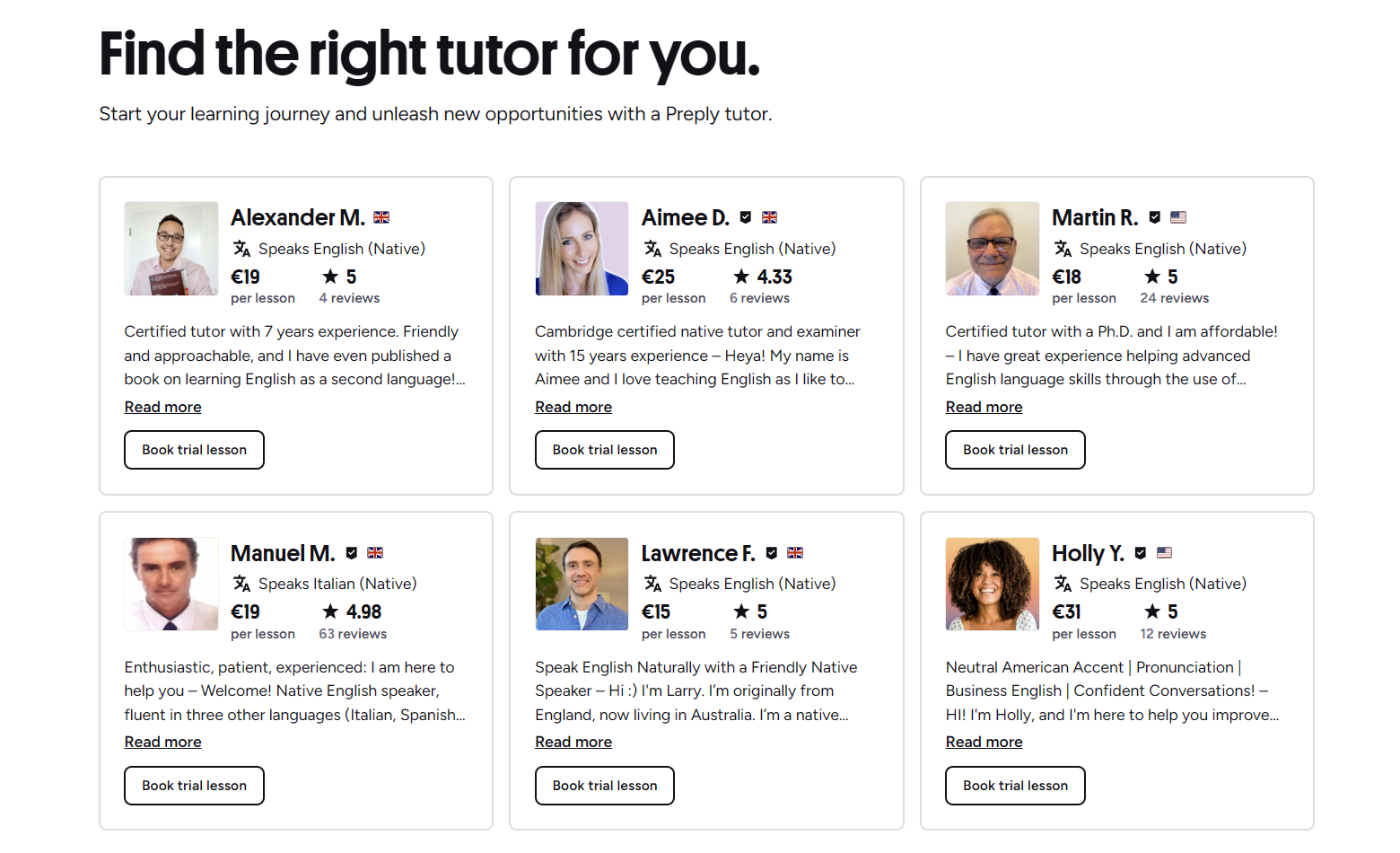
You cannot book a lesson until you identify a tutor who matches your needs. Preply provides filters for language, price range, availability, specialty, and tutor rating. The search results display each tutor's hourly rate, number of lessons taught, student reviews, and a short video introduction. Watching these videos is one of the fastest ways to gauge teaching style and personality fit.
- Filter by language and specific dialect if relevant
- Set a price ceiling to avoid wasting time on tutors outside your budget
- Check availability slots against your own schedule before reading profiles
- Read at least three recent reviews to spot patterns in feedback
- Watch the introduction video for teaching style and audio quality
Tutors often specialize in exam preparation, business vocabulary, conversation practice, or teaching children. The profile tags make these specialties visible. If you are preparing for IELTS or TOEFL, look for tutors who explicitly mention those exams. For casual conversation practice, a tutor with a relaxed, chat-based approach may work better than one focused on structured grammar drills.
After narrowing your list, open each tutor's full profile. The calendar shows available slots in your local time zone. Some tutors open new slots weekly; others keep a fixed schedule. If your preferred time is not visible, you can message the tutor directly to request a custom slot. Many are willing to accommodate regular students.

Understanding Preply Trial Lessons
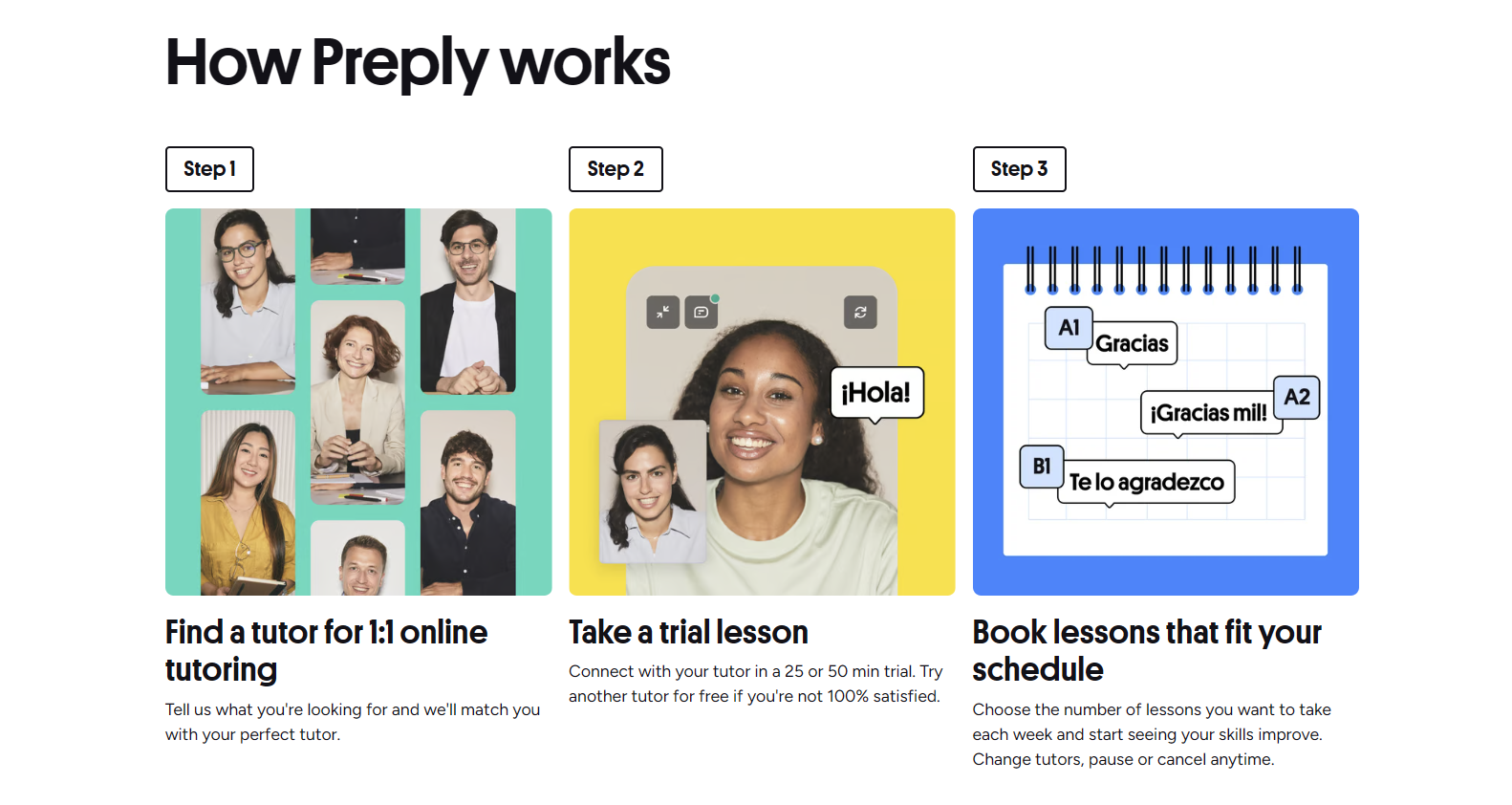
Trial lessons are the standard entry point for new students. They typically last 50 minutes and cost less than the tutor's regular hourly rate. The discount varies by tutor but often falls between 50% and 70% off. You can book trials with multiple tutors, though each tutor usually allows only one trial per student.
Scroll horizontally to see all columns
| Feature | Trial Lesson | Regular Lesson |
|---|---|---|
| Duration | 50 minutes | 50 or 60 minutes |
| Price | Discounted (set by tutor) | Full hourly rate |
| Limit per tutor | One per student | Unlimited |
| Refund if unsatisfied | Platform guarantee applies | Standard cancellation policy |
| Subscription required | No | Yes, for recurring booking |
The trial lesson is not a sales pitch. It functions as a real lesson where the tutor assesses your level, discusses goals, and demonstrates their teaching method. Come prepared with a clear idea of what you want to achieve. If you are a complete beginner, say so. If you want to focus on speaking confidence, mention that. The more specific you are, the better the tutor can tailor the session.
A trial lesson reveals more about tutor compatibility than ten profile reviews.
If the trial goes well, you can book a package immediately from the lesson interface or the tutor's profile. If it does not, you are under no obligation to continue. Preply's satisfaction guarantee covers trial lessons, meaning you can request a refund or a free replacement trial with another tutor if the experience falls short of expectations.
Step-by-Step Booking Process
Once you have chosen a tutor and a time slot, the booking flow takes just a few clicks. The steps are consistent whether you are on desktop or mobile. First, log into your Preply account. If you do not have one, you will be prompted to create it during checkout. The platform supports email, Google, and Apple sign-in.
- Navigate to the tutor's profile and click Book Trial Lesson or Choose Plan
- Select an available time slot from the calendar
- Confirm the lesson duration (50 or 60 minutes where offered)
- Enter payment details if not already saved
- Review the booking summary and click Confirm
- Check your email for the confirmation and calendar invite
Payment is required at the time of booking for trial lessons. For subscription plans, the first charge occurs immediately and subsequent charges follow the billing cycle you selected. Preply accepts major credit cards, PayPal, and in some regions local payment methods. The platform does not store full card details; it uses tokenized payment processors.
Choosing Lesson Duration and Frequency
Preply offers 50-minute and 60-minute lesson options. The 50-minute format is standard for trial lessons and most regular sessions. Some tutors offer 60-minute slots at a proportional rate increase. The difference is small but can matter for intensive study plans. Frequency is entirely up to you. Most students book one to three lessons per week.
Scroll horizontally to see all columns
| Goal | Recommended Frequency | Typical Duration |
|---|---|---|
| Casual maintenance | Once per week | 50 minutes |
| Steady progress | Twice per week | 50 minutes |
| Exam preparation | Three times per week | 50-60 minutes |
| Intensive immersion | Daily or 4-5 times per week | 60 minutes |
Consistency beats intensity for most learners. Two 50-minute lessons per week spaced a few days apart allows time for homework and review between sessions. If you book a subscription, the platform reserves your recurring slot with the tutor. This prevents other students from taking your preferred time but also means you are charged whether you attend or not unless you cancel within the policy window.
You can also book single lessons without a subscription. This pay-as-you-go approach suits irregular schedules but costs more per hour and does not guarantee the same time slot each week. Tutors prioritize subscription students for prime-time availability. If you find a tutor you like and can commit to a regular schedule, the subscription model usually saves money and secures your slot.
Payment Methods and Subscription Plans
Preply subscriptions come in weekly, monthly, and quarterly billing cycles. The per-lesson price decreases with longer commitments. A monthly plan might cost $15 per lesson while a quarterly plan drops to $13 per lesson for the same tutor. The trade-off is upfront commitment. You can cancel anytime, but the cancellation takes effect at the end of the current billing period. No prorated refunds are issued for unused lessons within that period.
- Weekly: highest per-lesson cost, maximum flexibility
- Monthly: balanced option, popular with regular students
- Quarterly: lowest per-lesson cost, requires three-month commitment
- All plans auto-renew unless cancelled before the next billing date
The subscription dashboard shows your next billing date, remaining lessons in the current cycle, and the tutor's availability. You can pause a subscription for up to four weeks if you need a break. Pausing stops billing and releases your time slot. The tutor is not obligated to hold the slot during a pause, though many will if you communicate in advance.
Managing Your Schedule and Rescheduling
Life happens. Preply allows rescheduling up to four hours before the lesson start time without penalty. The tutor must approve the new time. If you need to cancel entirely, the same four-hour window applies for a full credit refund to your Preply balance. Cancellations within four hours are considered late and the lesson is charged as attended.
Scroll horizontally to see all columns
| Action | Notice Required | Result |
|---|---|---|
| Reschedule | 4+ hours before | Free, tutor approval needed |
| Cancel for credit | 4+ hours before | Full credit to Preply balance |
| Late cancel or no-show | Less than 4 hours | Lesson charged, no credit |
| Tutor cancels | Any time | Full credit + optional makeup |
The four-hour policy is stricter than some competitors. It protects tutors who reserve time for you and may turn away other students. If your schedule is unpredictable, consider booking single lessons rather than a subscription. You can also message tutors directly; some are willing to make exceptions for genuine emergencies, but they are not required to.
The four-hour window feels tight until you are the tutor waiting for a student who never shows.
Recurring subscription lessons can be rescheduled individually without affecting the rest of the series. Go to Upcoming Lessons, select the specific session, and choose Reschedule. The tutor sees the request and can accept or propose an alternative. If the tutor does not respond within a reasonable time, Preply support can intervene.
Using the Preply Mobile App for Booking
The Preply mobile app mirrors the desktop booking flow but adds push notifications for upcoming lessons, tutor messages, and schedule changes. You can book, reschedule, and cancel from the app. The calendar view is compact but functional. For students who manage lessons on the go, the app reduces the chance of missing a session or forgetting to cancel in time.
- Push reminders 24 hours and 1 hour before each lesson
- In-app video calling for lessons (no separate Zoom or Skype needed)
- Chat with tutors between sessions for homework questions
- Offline access to lesson notes and vocabulary lists
- Quick rebooking of favorite tutors from the home screen
The app also supports picture-in-picture mode during video lessons, so you can reference a dictionary or notes without leaving the call. Some tutors share screen content through the app's built-in whiteboard. The experience is smoother on a tablet than a phone due to screen size, but both work.
If you prefer desktop, the browser-based classroom works on Chrome, Firefox, Safari, and Edge. No software installation is required. The app is optional but convenient for schedule management. Your account syncs across devices automatically.
What Happens After You Book
After booking, the lesson appears in your dashboard with a Join Lesson button that activates five minutes before the scheduled start. The tutor receives a notification and prepares any materials you discussed. For trial lessons, tutors often send a brief placement test or questionnaire beforehand to make the session more productive.
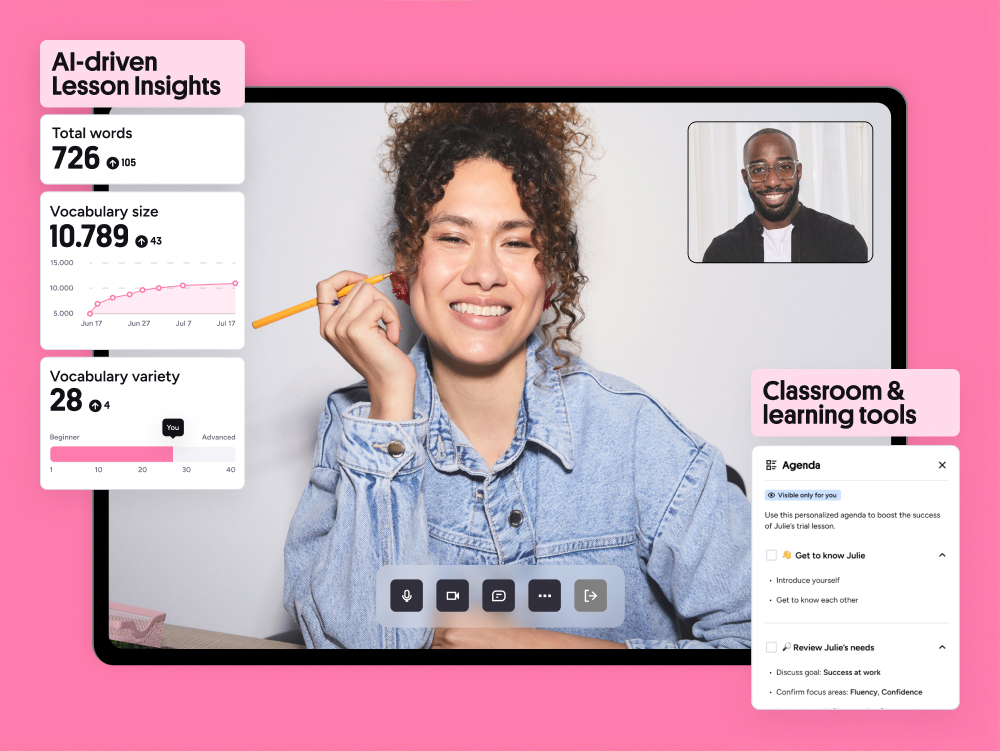
During the lesson, the classroom interface includes a shared whiteboard, chat box, file sharing, and screen sharing. Tutors can upload PDFs, images, or exercises in real time. After the lesson, both parties can leave private notes visible only to themselves. These notes accumulate into a personal learning log that helps track progress over weeks and months.
Common Booking Issues and Solutions
Even with a smooth platform, issues arise. The most frequent problem is a tutor not showing up. If the tutor is more than ten minutes late, you can leave the classroom and request a full credit refund through support. Preply typically processes these within 24 hours. Another common issue is double-booking, where a tutor accepts a slot that was already reserved. The system prevents this in most cases, but glitches happen.
- Tutor no-show: wait 10 minutes, then contact support for credit
- Double-booking: platform usually resolves automatically, contact support if not
- Payment declined: update card details and retry, slot held for 15 minutes
- Time zone confusion: verify the lesson time in your dashboard matches your calendar
- Technical failure during lesson: both parties can request a makeup or partial credit
Time zone errors are surprisingly common. Preply displays times in your detected local zone, but if you travel or your device settings are wrong, the displayed time shifts. Always verify the lesson time in the Upcoming Lessons section, which shows both your time and the tutor's time. Add the .ics file to your calendar as a backup.
Check the time zone twice. The platform is right, but your phone might be lying.
Preply for Business: Team Booking
Companies using Preply Business have a different booking workflow. Administrators purchase seat licenses and assign them to employees. Employees then book lessons within the organization's plan without individual payment. The admin dashboard tracks utilization, progress, and spending across the team. This centralized model simplifies budgeting but adds an approval layer for new tutors or schedule changes.
Scroll horizontally to see all columns
| Aspect | Individual Account | Business Account |
|---|---|---|
| Payment | Per lesson or subscription | Prepaid seat licenses |
| Tutor selection | Free choice | May require admin approval |
| Scheduling | Self-managed | Self-managed within policy |
| Reporting | Personal progress only | Team analytics dashboard |
| Billing | Monthly or quarterly | Annual contract typical |
Business plans often include dedicated account managers who help match employees with tutors based on role-specific needs. For example, a sales team might get tutors specializing in negotiation vocabulary, while engineers get technical English specialists. The booking interface for employees looks similar to the individual version but hides pricing and shows only tutors approved for the company's program.
Progress Tracking and Lesson History
Every completed lesson adds to your history log. You can see total hours, tutors worked with, and languages studied. Preply also generates a progress report after each lesson if the tutor fills it out. These reports cover topics covered, vocabulary introduced, homework assigned, and a brief assessment. Over time, they form a record you can export or share with employers or schools.
The platform also offers an English level test and periodic reassessments. These are separate from lessons and free to take. The results help you and your tutor adjust the curriculum. For other languages, level testing varies by tutor. Some use CEFR-aligned assessments; others rely on conversation evaluation.
Final Assessment of Preply Lesson Booking
Booking on Preply works well for self-directed learners who know what they want. The marketplace model puts choice in your hands but also puts the burden of selection on you. Trial lessons reduce risk. Subscriptions reduce friction for regular study. The four-hour cancellation policy is strict but fair to tutors. The mobile app adds convenience without being essential.
The main friction points are tutor availability at popular hours and the lack of a guaranteed makeup policy for late cancellations. If your schedule is rigid, book early and consider a subscription to lock in slots. If your schedule shifts weekly, pay-as-you-go single lessons avoid wasted credits. Either way, start with trials. They are the only way to know if a tutor's teaching style matches your learning style before money changes hands.
Frequently Asked Questions
Can I book a lesson without creating an account?
No. You must create a Preply account before booking any lesson, including trials. The signup process takes under a minute with Google or Apple login.
How many trial lessons can I book with different tutors?
You can book one trial lesson per tutor. There is no platform limit on how many different tutors you can try, but each tutor allows only one discounted trial per student.
What happens if my tutor cancels a lesson?
You receive a full credit refund to your Preply balance automatically. The tutor may also offer a makeup session, but that is arranged between you and the tutor.
Can I switch tutors after starting a subscription?
Yes. You can cancel your subscription with one tutor and start a new one with another. The cancellation takes effect at the end of the current billing period. Unused lessons in that period are not refunded.
Does Preply offer group lessons or only one-on-one?
Preply focuses on one-on-one lessons. Some tutors offer small group sessions for two to three students, but these are arranged privately and not booked through the standard marketplace flow.
What payment methods does Preply accept?
Major credit cards (Visa, Mastercard, American Express), PayPal, and in some countries local methods like iDEAL, Sofort, or Boleto. The available options appear at checkout based on your billing address.
How do I get a refund for a trial lesson I did not like?
Contact Preply support within 48 hours of the lesson. The satisfaction guarantee covers one trial lesson per student. You can choose a refund to your original payment method or a free trial with a different tutor.